
How to Use Multiple Signatures in a Single Mailbox (Not Recommended Practice)
Important Notice:
This method is not the recommended way to manage emails with multiple users on a single mailbox. Microsoft is gradually closing this loophole. For best results and long-term compatibility, use Shared Mailboxes as officially recommended.
However, if you still wish to proceed, follow the steps below to set up multiple signatures for one mailbox using the Outlook desktop client.
Step-by-Step Guide
- Open the Outlook Desktop Client, and click “New Email.”
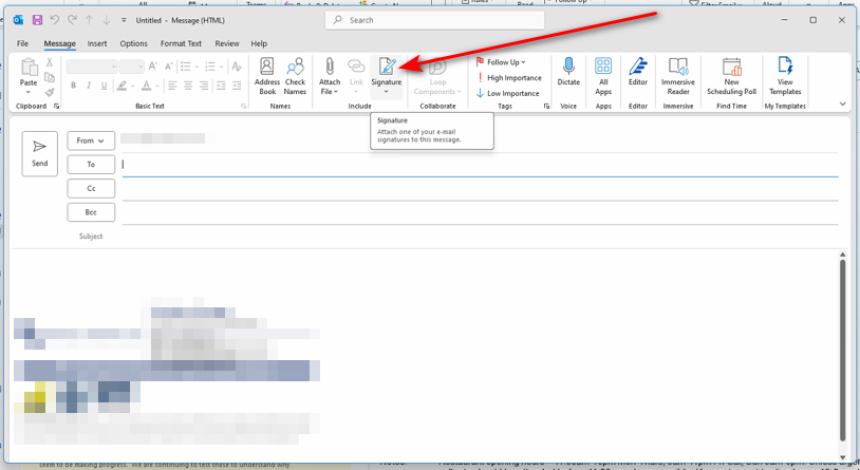
- In the top menu bar, click “Signature.”
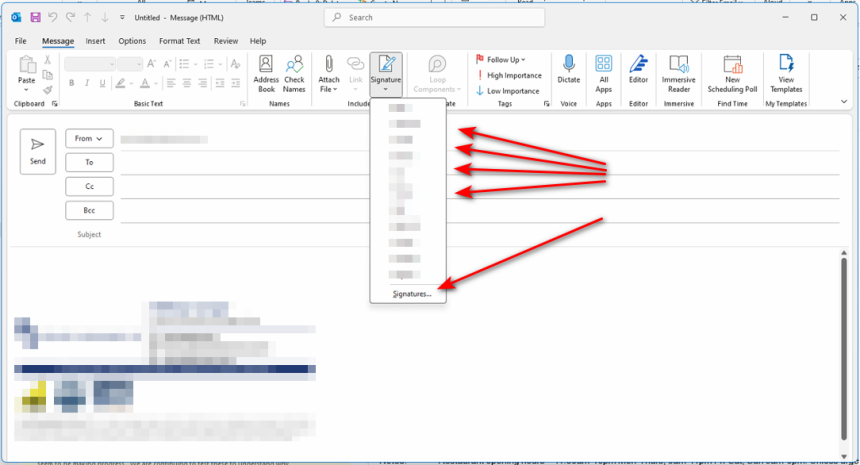
- This will open a dropdown list showing all existing signatures associated with the account.
- Choose an Existing Signature or click “Signatures…” at the bottom of the dropdown to open the Signatures and Stationery window.
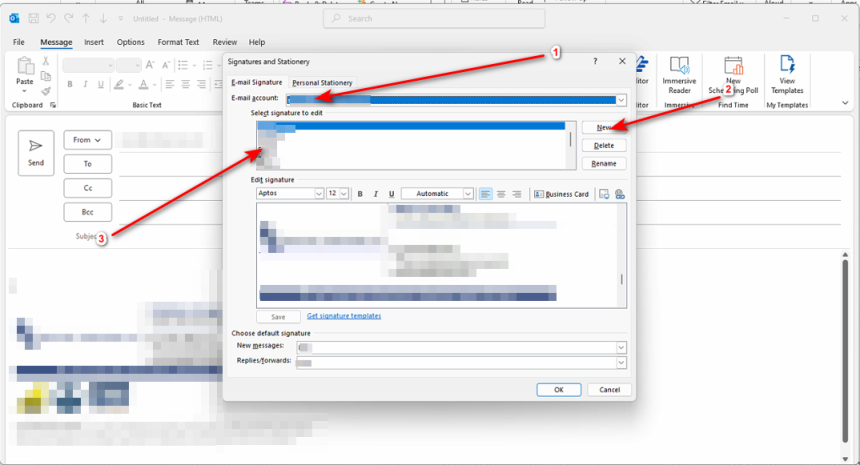
- In the Signatures and Stationery window:
Choose the correct email account from the dropdown at the top.
Either:
Create a new signature by clicking "New", or
Edit an existing signature from the list under “Select signature to edit”.
Use the editor below to add text, images, or links to your signature.
Be cautious with the number of images, hyperlinks, or promotional text you include in a signature. Overuse of these elements increases your spam score, which can result in your emails being flagged or undelivered.
- Once your signature is finalised:
- From the dropdown at the top of the window, select the email account.
- Assign the signature for:
- New emails
- Replies/Forwards
- Save your changes.
Final Note
As previously mentioned, this method exploits a workaround that Microsoft is gradually shutting down. If your organization needs multiple users to send emails from one mailbox with individualized signatures, a Shared Mailbox is the officially supported solution.
For advanced signature management, consider using a third-party solution like Exclaimer, which is available upon request.