
Support Team 7 months ago
SupportTeam #teams

Reset or change your Hello PIN

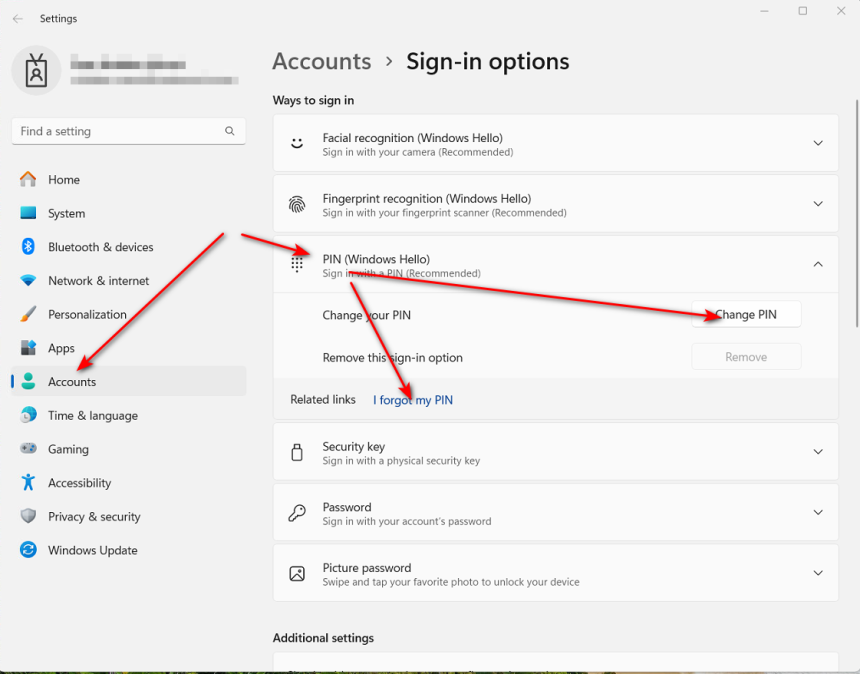
If your organisation is connected to an Entra Cloud Domain, you may be using a Hello PIN to log in to your desktop. If you forget your PIN or want to change it, please follow the screenshots and instructions below.

To reset your Hello PIN from the login screen, click the appropriate link provided. Alternatively, click the "Sign in with password" link, then reset your PIN from the desktop as shown in the next example.
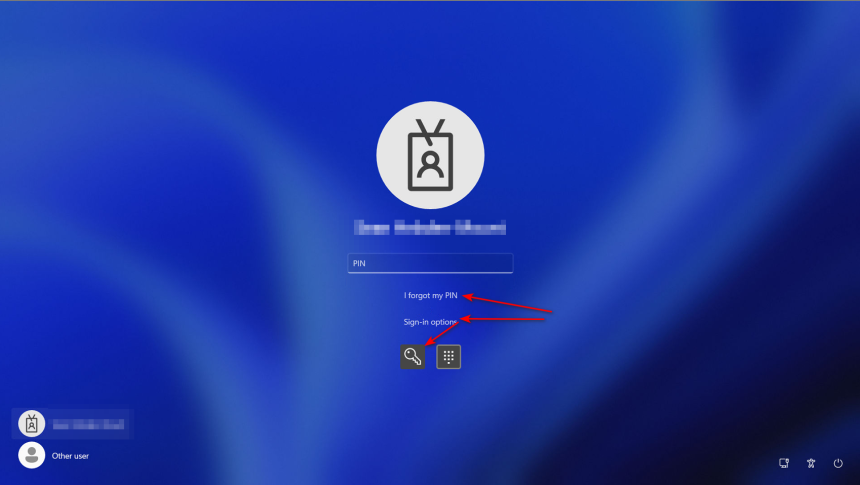
To reset your Hello PIN from the desktop, click the appropriate link.
0
495
Using Barracuda Archive Search App

Using Barracuda Archive Search App

1738943233.png
Support Team
9 months ago
How to Release a Quarantined Email from Your Personal Mailbox Using the Barracuda Email Protection Portal

How to Release a Quarantined Email from Your Personal Mailbox Using th...

1738943233.png
Support Team
6 months ago
Critical Risks of Excessive Spreadsheet Linking in Excel

Critical Risks of Excessive Spreadsheet Linking in Excel

1738943233.png
Support Team
1 year ago
Best Practices for Laptop Battery Health: Should You Keep It Plugged In?

Best Practices for Laptop Battery Health: Should You Keep It Plugged I...

1738943233.png
Support Team
9 months ago
How to Add the "From" Field in Outlook When Sending from a Shared Mailbox

How to Add the "From" Field in Outlook When Sending from a Shared Mail...

1738943233.png
Support Team
4 months ago